Parapet Desktop · Windows app · no Revit needed

8,087 elements, read in under a second.
Revit never opened. That is Autodesk's own sample project, read straight from the .rvt file.

Drop a .rvt, .rfa or .rte on the window. Parapet Desktop reads the file itself and shows its health score, categories, families, views, links and save history. No Revit licence is used, no model is opened, nothing is written to the file.

Free edition: the whole audit No registration to start Models stay on your computer Verified on Revit 2021, 2024, 2026 and 2027 files
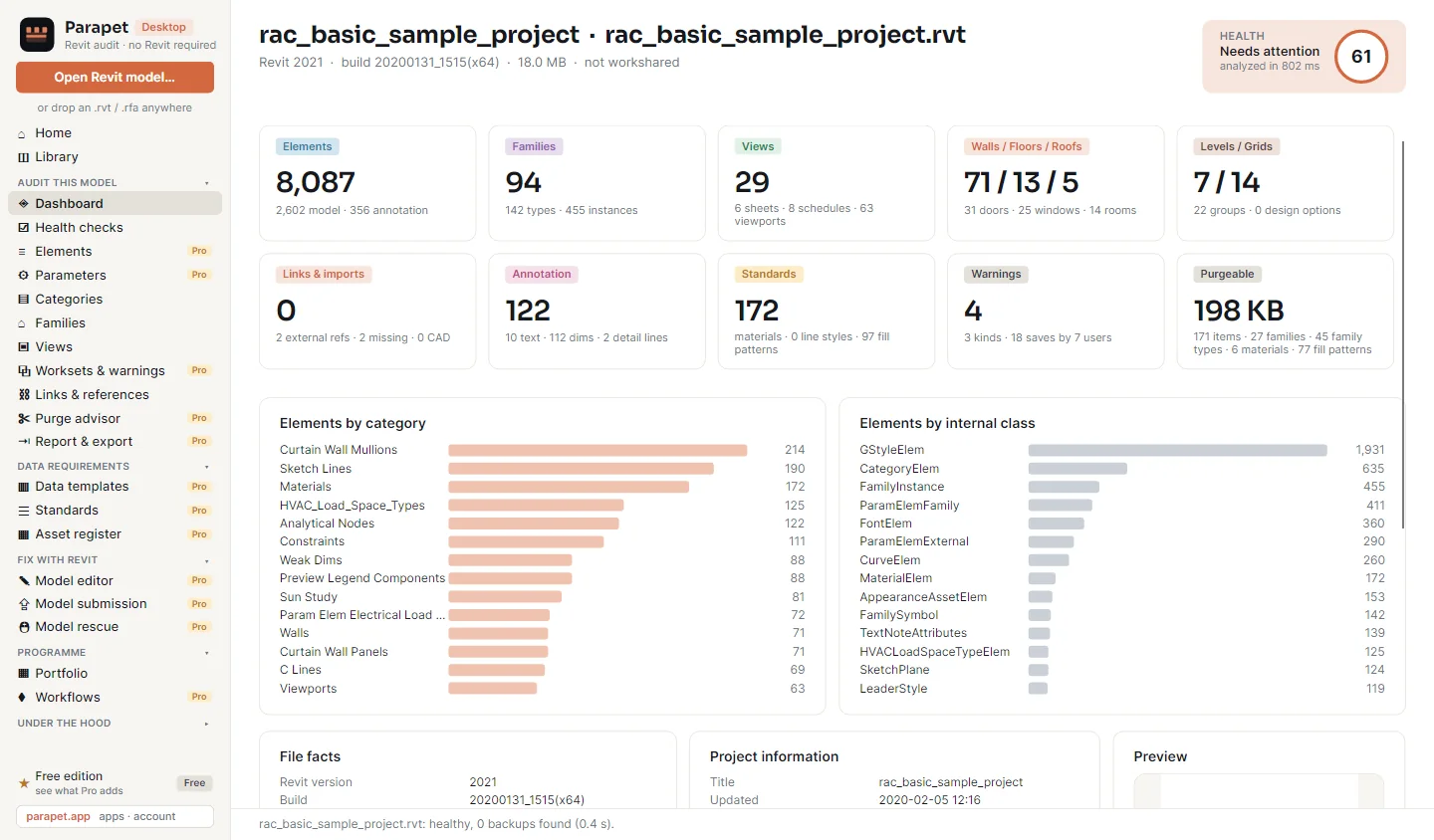
The Parapet Desktop dashboard for Autodesk's basic sample project: health score 61, analysed in 802 milliseconds; cards for 8,087 elements, 94 families, 29 views, 71 walls, 7 levels, 122 annotations, 4 warnings and 198 KB purgeable; bar charts of elements by category.
The dashboard of an 18 MB project: 8,087 elements, 94 families, 29 views, 4 warnings, 198 KB to purge - and the score that sums it up.
0.8 sto read the 18 MB sample project, start to score
29built-in health checks, with thresholds you can set per office
926parameters found in that one model, each with its fill rate
0bytes written to the model by an audit
Finding out whether a model is healthy should not cost a Revit licence, the right release and ten minutes of loading. The answer is already in the file.

The model you cannot open

Saved in a release you do not have installed.

A consultant sends a model from a newer Revit, or an archive holds one from an older one. Opening it means installing, upgrading or asking someone else.

Desktop: drop the file - the audit is on screen in seconds
The folder of forty models

The monthly review, one model at a time.

Open, wait, look, close, next. A programme review is mostly waiting for Revit to load models nobody needs to edit.

Desktop Pro: batch mode scans the folder and writes one report per model plus a portfolio table
The client's asset register

The requirements arrive as a spreadsheet.

Checking that every door, pump and panel carries the fields the employer asked for is a week of schedules and filters.

Desktop Pro: import the register, link its fields to parameters, get the gap list

1 · Audit this model - free

The whole audit is in the free edition, with no registration. Every scan is kept in the library, so the second scan of a model already shows what changed.

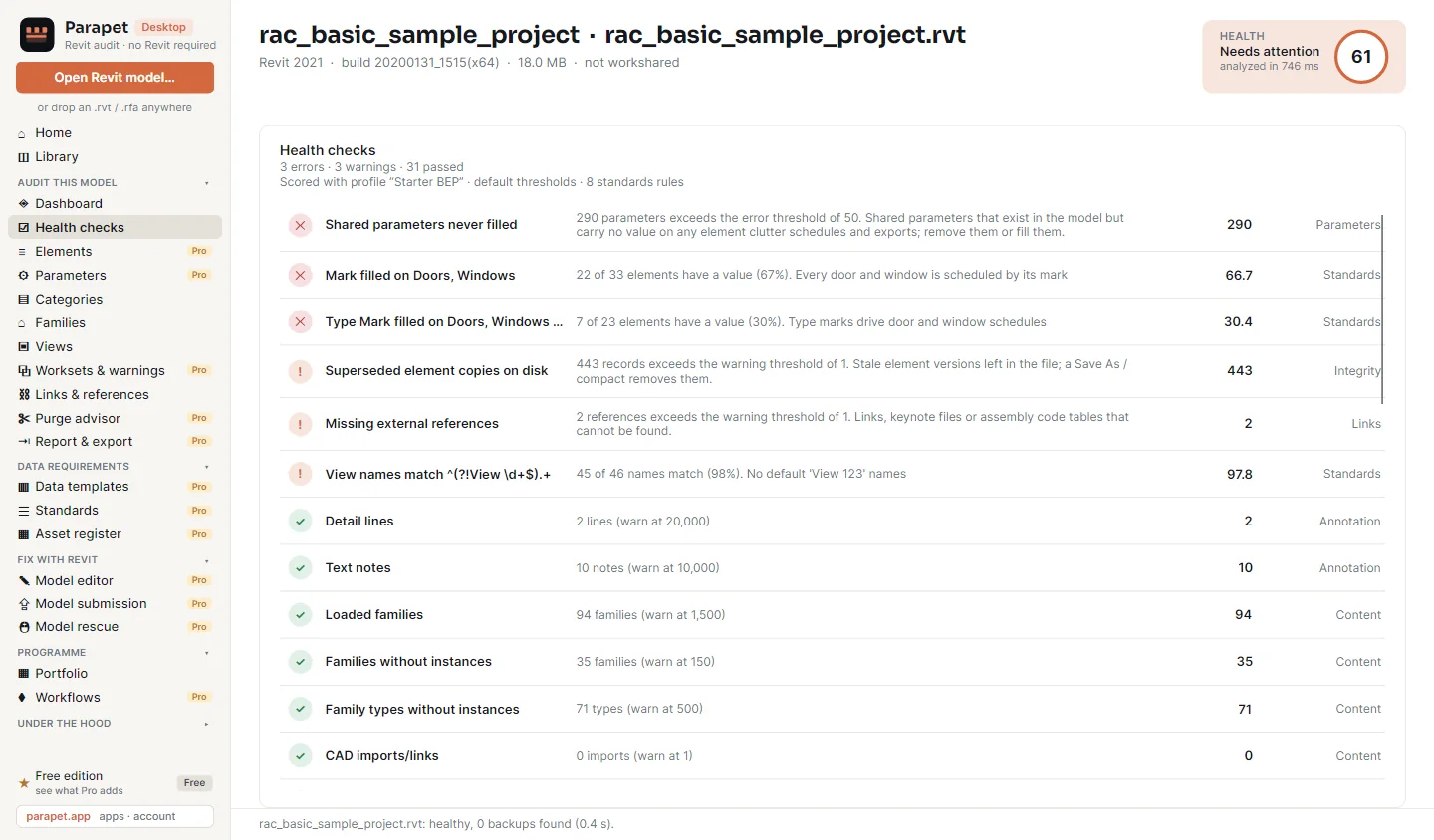
The Health checks page: 3 errors, 3 warnings and 31 passed. Shared parameters never filled 290, Mark filled on doors and windows 67 percent, superseded element copies on disk 443, missing external references 2, then passed checks for detail lines, text notes, loaded families and CAD imports.
3 errors, 3 warnings, 31 passed. Each line says what was counted, against which threshold, and why it matters.

Health checks and a score

29 built-in checks on size, content, annotation, links and integrity. Each has a warning and an error threshold, and the score counts both.

Categories, families, views

Elements per category, families with their types and instances, in-place and unused families, which views sit on which sheet and which were never placed.

Links and references

Every linked model, CAD file, keynote and assembly code table with its path and load state. References that cannot be found are a health check of their own.

History

Who saved the model and when: the sample project shows 18 saves by 7 users. Worksharing history lists every synchronise with central.

File composition

Where the megabytes are. What each part of the file weighs, and whether every block passes its checksum.

Library and portfolio

Every model you have scanned, its scans over time and its health trend. The portfolio table puts the latest scan of every model on one page.

2 · Down to the element - Pro

Pro opens the model's content: every element with its parameters, every parameter with its fill rate, everything that can be purged with the bytes it frees.

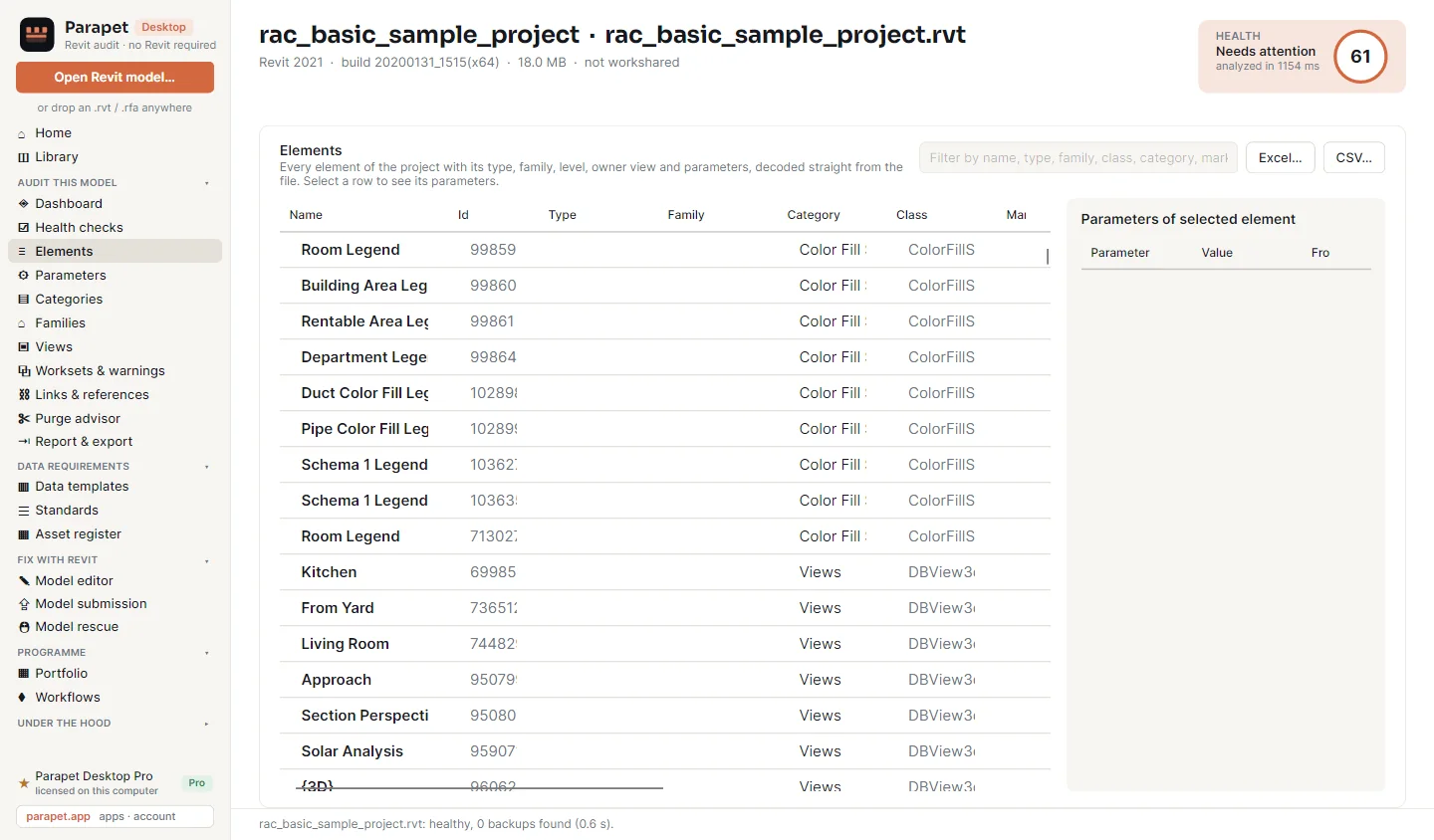
The Elements page: a table of elements with name, id, type, family, category and class, a filter box, Excel and CSV export buttons, and a panel for the parameters of the selected element.
Elements. Every element with its type, family, level, owner view, phase, workset and parameters. Filter, select, export to Excel or CSV.
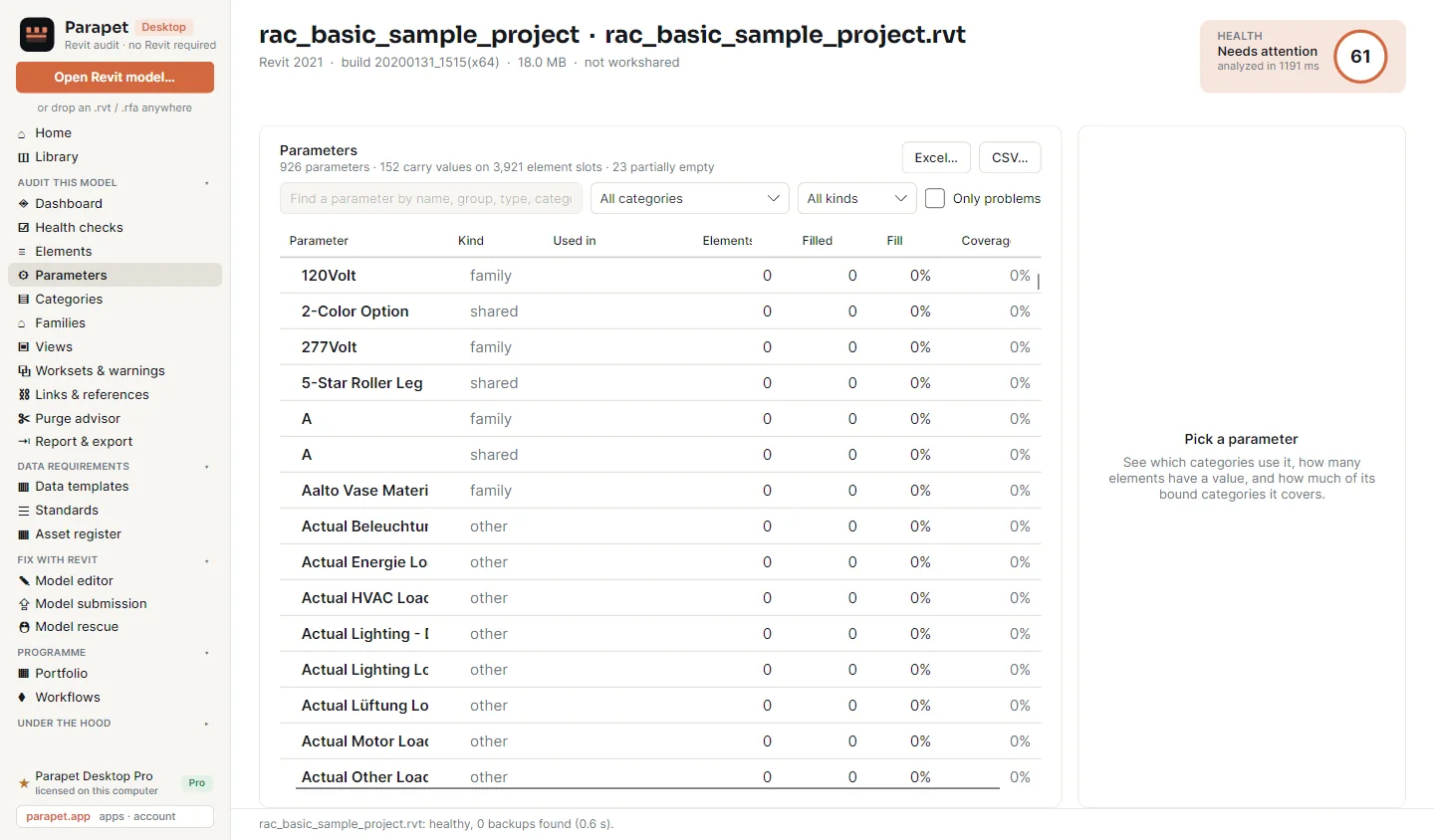
The Parameters page: 926 parameters, 152 carrying values on 3,921 element slots, 23 partially empty; a table with parameter name, kind, used in, elements, filled, fill rate and coverage.
Parameters. 926 in the sample project; 152 carry values. Fill rate and coverage per parameter, with a filter for the ones that have problems.
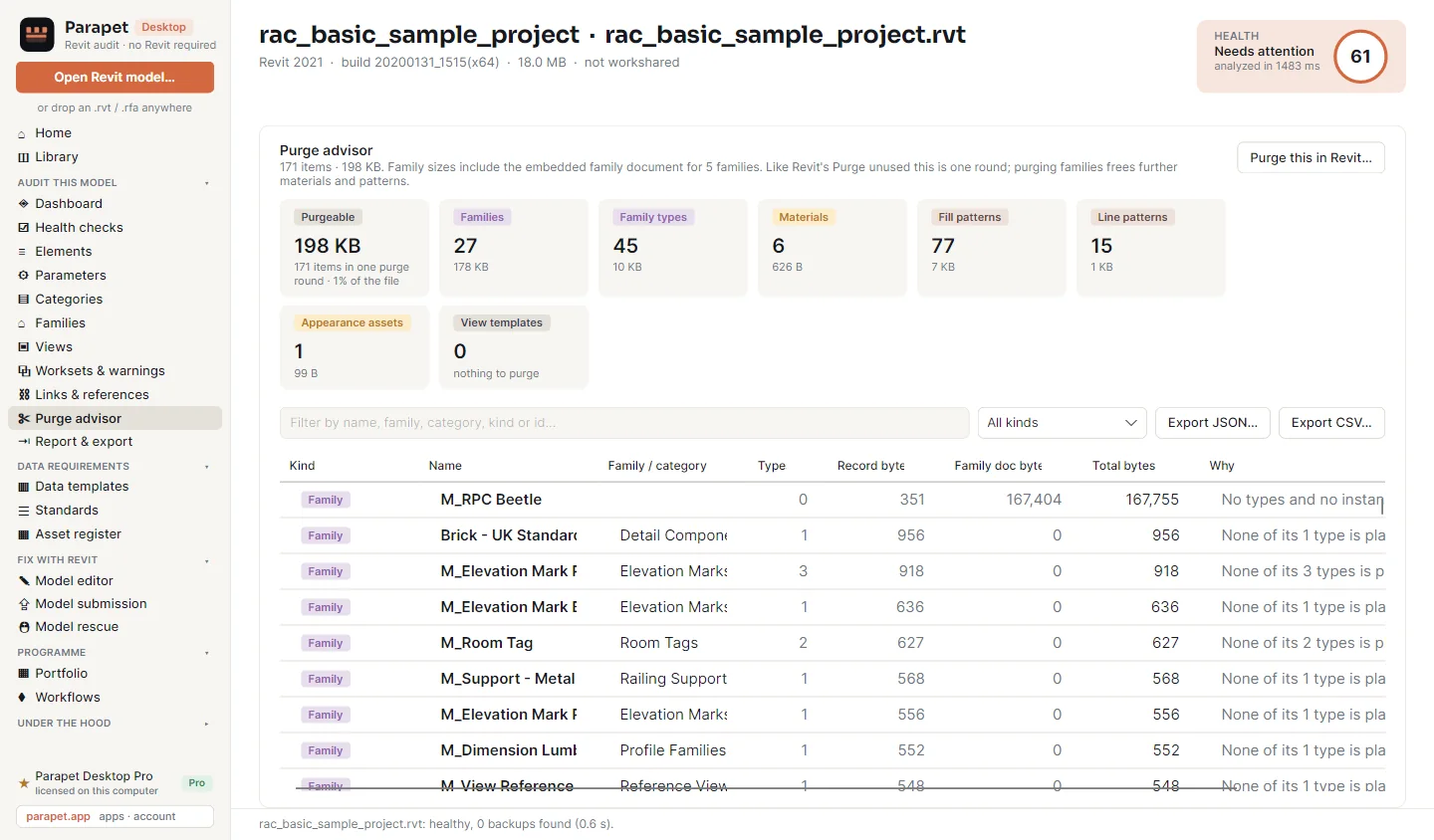
The Purge advisor: 171 items, 198 KB. Cards for 27 families, 45 family types, 6 materials, 77 fill patterns and 15 line patterns; a list of families with their record and family document bytes and the reason each can go.
Purge advisor. 171 items here: unused families with the bytes they hold, unplaced types, materials and patterns nothing refers to. Purge this in Revit has your own Revit save a purged copy.
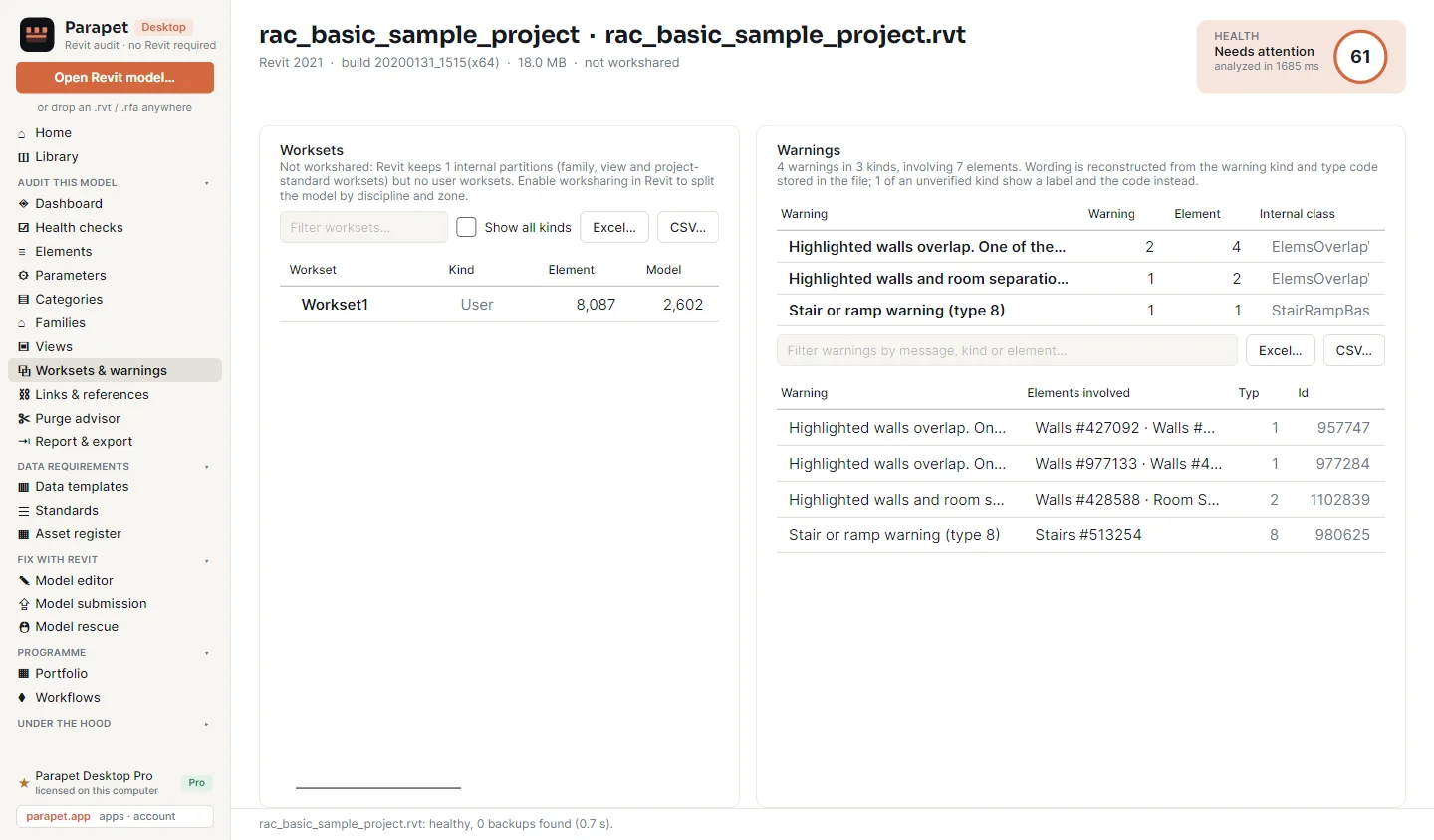
The Worksets and warnings page: one user workset with 8,087 elements, and 4 warnings in 3 kinds - highlighted walls overlap, walls and room separation lines overlap, a stair warning - each with the elements involved.
Worksets and warnings. Warnings in Revit's own wording, grouped like the warnings dialog, with the elements involved.

3 · Does it carry what the client asked for - Pro

Standards are your office's rules. Data templates are the client's. Both score every scan.

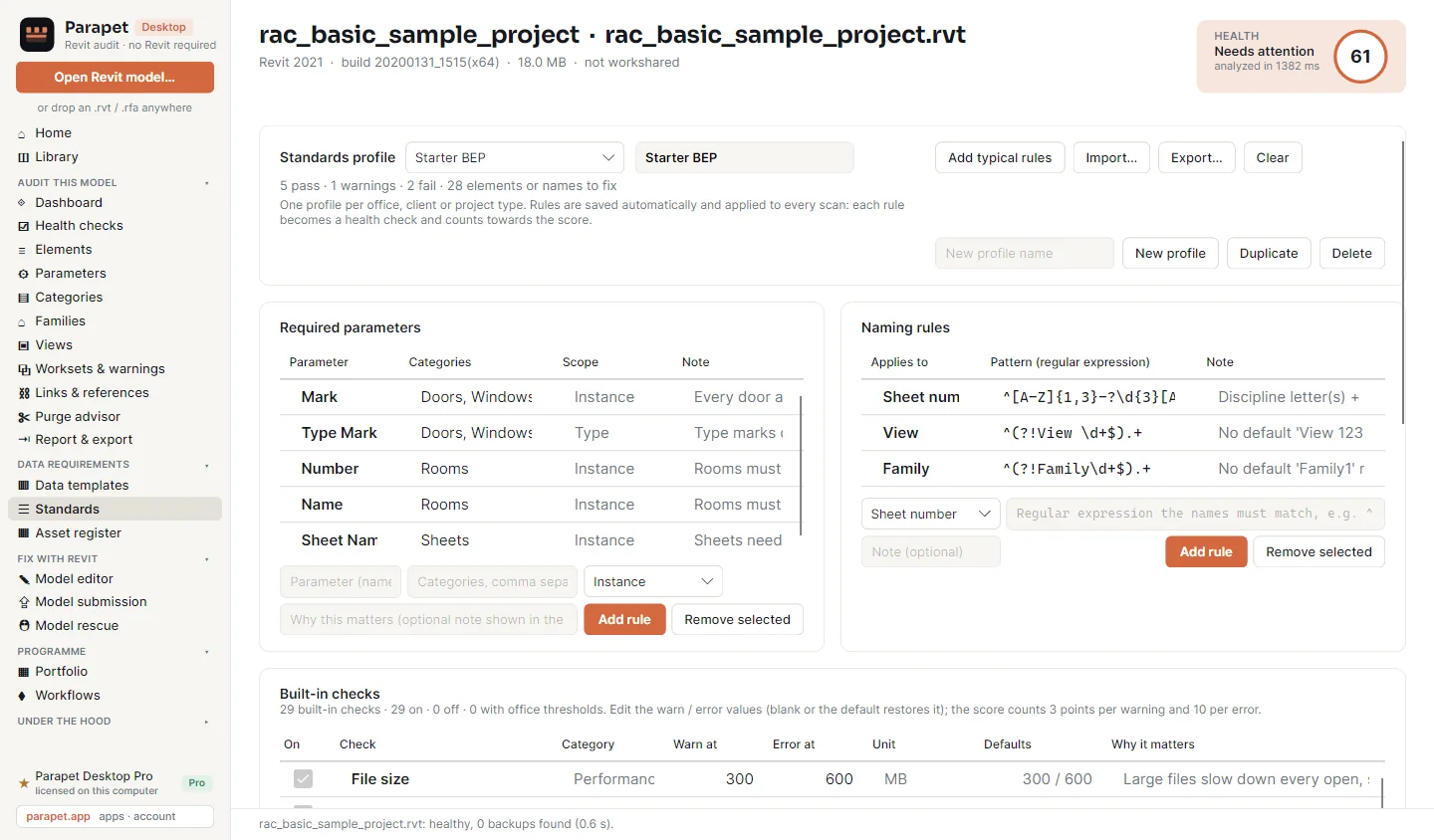
The Standards page: a profile named Starter BEP with 5 pass, 1 warning and 2 fail; required parameters such as Mark on doors and windows and Number on rooms; naming rules for sheet numbers, views and families as regular expressions; and the list of built-in checks with editable thresholds.
One profile per office, client or project type. Required parameters per category, naming patterns, and your own thresholds for every built-in check.

Standards profiles

Rules are saved as they are typed and applied to every scan. Each rule becomes a health check and counts towards the score. Profiles import and export as JSON.

Data templates

Import an asset register, a COBie sheet or a LOIN requirement list as Excel, CSV, JSON, Word, ODS, PDF or text. Every field is linked to a parameter of the model; you confirm a link once and it is remembered.

The gap list

A run reports each element as not bound, empty or filled, checks formats, allowed values and ranges, and writes a workbook in the register's own column order.

4 · Fix with Revit, without opening Revit yourself - Pro

Reading needs no Revit. Writing does, so Desktop runs the Revit you already have in the background and reports back.

Model editor

Edit parameter values in a grid or import them from a spreadsheet, review the changes, then apply them - to one model or to every model in a folder.

Model submission

The copy you issue: links, CAD, images, unplaced views and unused content stripped, the file compacted and saved as a copy.

Model rescue

For a heavy or damaged file: it is checked first, opened with audit, repaired and saved as a copy, falling back to the backups when the file itself will not open.

Every job saves a copy; the source model is not touched unless you choose to write into it. Fix with Revit needs Autodesk Revit 2021 or later on the same computer. The audit itself never does.

5 · The whole programme, and every export - Pro

Forty models are a folder, not forty sessions.

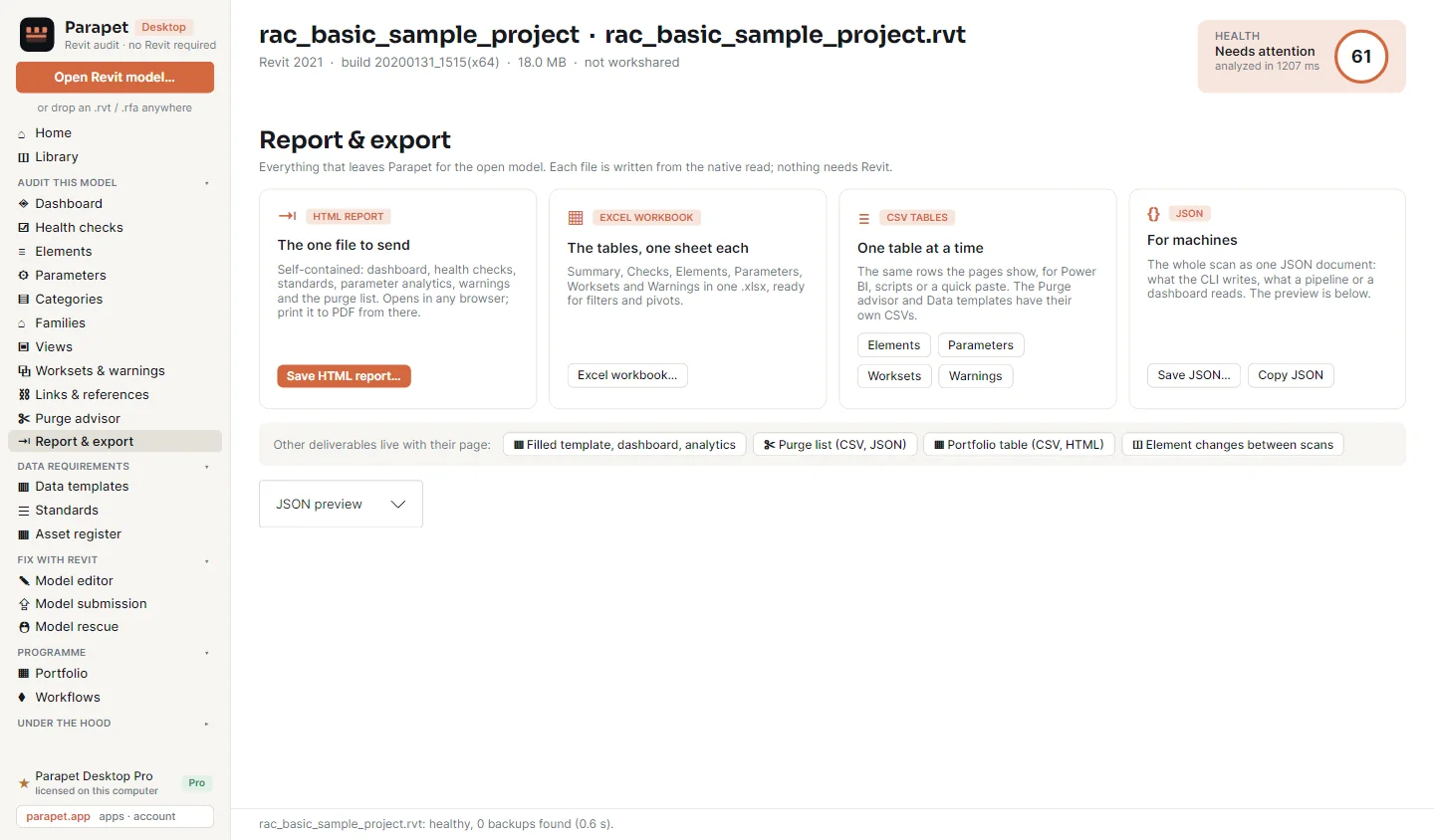
The Report and export page: an HTML report, an Excel workbook with one sheet per table, CSV tables for elements, parameters, worksets and warnings, and a JSON document, with buttons for filled templates, purge lists and the portfolio table.
Four ways out. One HTML report to send, an Excel workbook with a sheet per table, CSV for Power BI, JSON for a pipeline.

Batch mode

Scans a folder and everything under it, skips Revit's backup copies, and writes one report per model plus a portfolio index. Reports go to your Documents folder, never into the scanned one.

Workflows

Chain the steps on a canvas: models from a folder, filter by discipline, audit against a template, portfolio report. Six starters are included; a workflow is saved as a file a colleague can import.

Command line

parapet batch, parapet export, parapet compare: the same engine for a scheduled task or a build server, in the same folder as the app.

Free and Pro

Free is not a trial. It stays free, and it needs no account.

FreePro
Dashboard, health checks and score
Categories, families, views and sheets
Links and references, file composition, save history
Library of every scan, scan-to-scan comparison of the numbers, portfolio table
Elements browser with every parameter
Parameter analytics: usage, fill rate, coverage
Purge advisor, worksets and warnings
Standards profiles and data templates
Element-by-element comparison of two scans
Batch mode and workflows
Fix with Revit: model editor, submission, rescue
Exports: HTML report, Excel, CSV, JSON

Part of the Parapet family

Desktop looks at the file from outside. The add-ins work inside Revit. One Parapet Pro key covers them all.

Inside Revit instead?

Parapet Audit (free) lists every external file the open model carries, grades it and fixes it with one undo.

Found 290 empty parameters?

Parapet Hub fills them in bulk in one grid, with a dry run before and one undo after.

Is it built as modelled?

Parapet Scan compares the laser scan with the model and gives every element a verdict.

Requirements

1
Windows 10 / 11, 64-bit
2
The .NET 9 Desktop Runtime, free from Microsoft - download page. Windows offers it on first start if it is missing.
3
No Autodesk software for the audit. Revit 2021 or later only for Fix with Revit.
4
No admin rights: extract the ZIP and run ParapetDesktop.exe

Install in 3 steps

Download the ZIP (18 MB) and extract all of it to a folder of your choice.
Run ParapetDesktop.exe. The files are not code-signed yet, so Windows SmartScreen may ask once: More info, then Run anyway.
Drop a model on the window. For Pro, open the Pro page at the bottom of the sidebar.

Check the file you got against the published SHA-256.

Parapet Desktop Pro · Pro licences open shortly - the free edition is ready now

Included in Parapet Pro and Parapet Team: one key for every Parapet app on the computer.

Download for Windows

Questions

Does Parapet Desktop need Revit?

No. It reads the model file itself, so the audit runs on any Windows 10 or 11 computer with no Autodesk software installed. Only the Fix with Revit jobs, which write to a model, use a Revit you already have (2021 or later), in the background.

Which Revit files can it read?

Projects, families and templates: .rvt, .rfa, .rte and .rft. It is verified on files saved by Revit 2021, 2024, 2026 and 2027.

Does it change my model?

The audit only reads. Nothing is written to the file. A model changes only when you start a Fix with Revit job, and that job runs through your own Revit.

What is free and what is Pro?

The free edition is the whole audit, with no registration: Library, Dashboard, Health checks, Categories, Families, Views, Links, File composition and History. Pro adds the Elements browser, Parameter analytics, the Purge advisor, Worksets and warnings, Standards, Data templates, Workflows, batch mode, Fix with Revit and every export.

How is Pro licensed?

With a key from parapet.app, entered on the Pro page of the app. A Parapet Desktop key covers Desktop; a Parapet Pro key covers every Parapet app on the computer. After activation the app works offline and checks in at least once every 14 days.

Do my models leave my computer?

No. Files are read on your computer and the results are kept in your own user profile. Only licence checks reach parapet.app.

See also: reducing Revit file size · Parapet for BIM managers · install and licensing · pricing.

Drop the file.
Read the model.

The free edition is the whole audit. Try it on the model that takes longest to open.

Windows 10/11 · .NET 9 Desktop Runtime · no Autodesk software needed

Parapet Desktop · audit Revit models without opening Revit · free editionDownload