Parapet Scan · scan vs model · Windows app and Revit 2021-2027

719,494 scan points. 138 elements.
21 of them fail. That is a test structure with planted defects, compared in 4.2 seconds.

Open the laser scan and the model. Parapet Scan measures every point against the nearest modelled surface and gives each element a verdict against the tolerance you set: pass, warning or fail - with the hotspots, the objects nobody modelled and the elements the scan never captured.

The desktop app is free, reports included Opens .rcp and .rcs as they are PDF, Excel, CSV and BCF out Scans stay on your computer
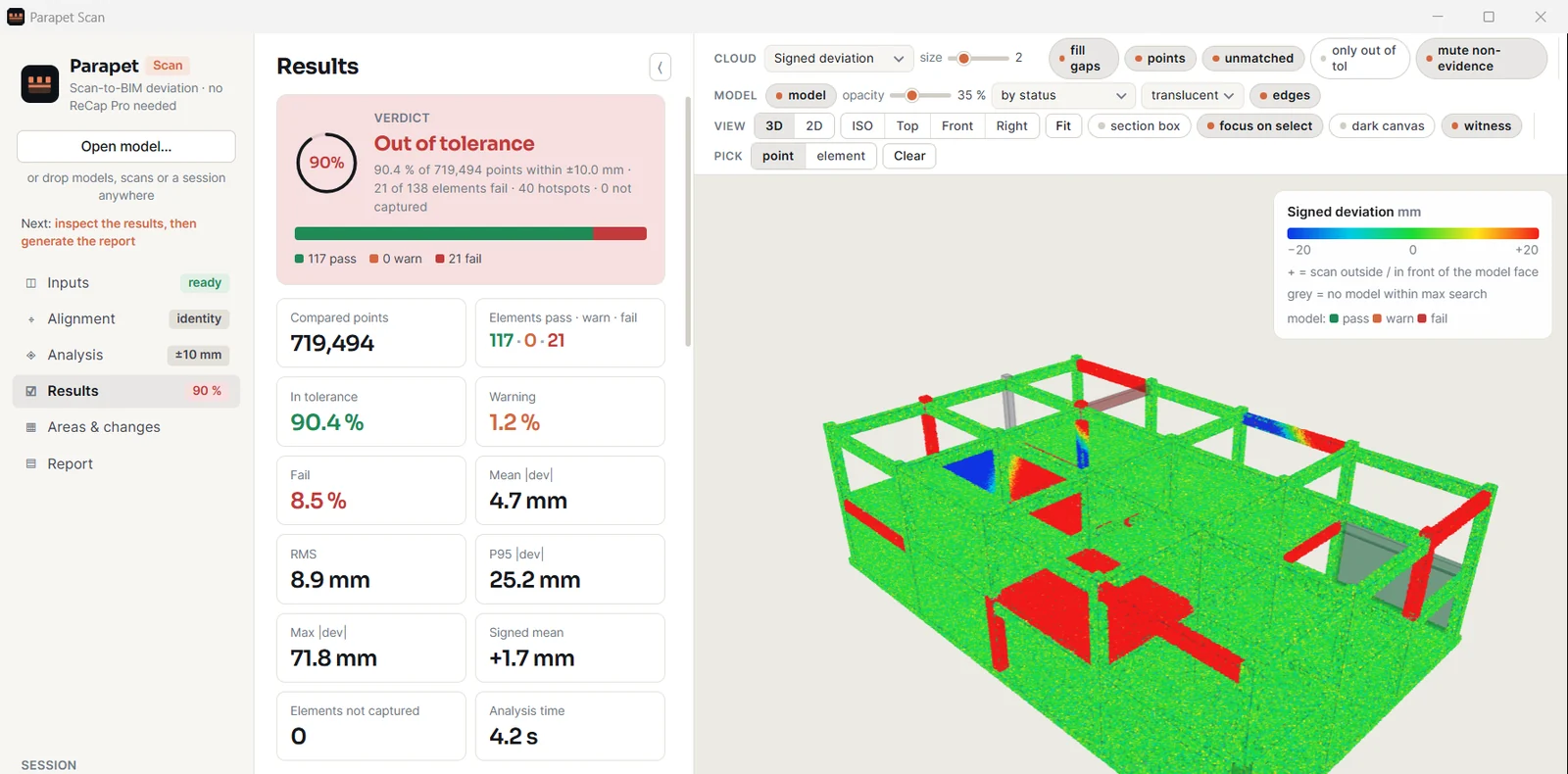
The Parapet Scan results page: verdict Out of tolerance, 90.4 percent of 719,494 points within plus or minus 10 millimetres, 21 of 138 elements fail, 40 hotspots; 117 pass, 0 warn, 21 fail; mean deviation 4.7 mm, maximum 71.8 mm; beside it the 3D view of a two-storey frame with passing elements in green and failing elements in red.
The verdict first, then the numbers behind it: 117 pass, 21 fail, and the frame coloured the same way.
4.2 sto compare 719,494 points with 138 elements
±10 mmin this run - the tolerance is yours to set, or a profile
40hotspots located, ranked by size, ready for a site walk
21elements out of tolerance, each named with its deviation
A coloured cloud over a model is a picture. A verdict per element, with the numbers behind it, is evidence.

Found after the partitions went in

The slab edge that sits 24 mm out.

The scan was on the server for three weeks. Nobody had the afternoon it takes to overlay it and look.

Scan: open both, run, read the list of failing elements
The export before the work

Hundreds of gigabytes, converted first.

Most tools want the scan in their own format, so the job starts with an export that takes longer than the comparison.

Scan: reads the ReCap project as it is, no ReCap Pro
The report nobody can sign

"It looks about right" is not a record.

A screenshot of an overlay carries no tolerance, no method and no count. It cannot be checked by the next person.

Scan: statistics per element and per face, the method stated in the report

1 · The desktop app - free

Six pages, in the order of the job: inputs, alignment, analysis, results, areas and changes, report. The primary button always names the next step.

Scans as they are

A ReCap project (.rcp) with all its scans, or single .rcs files, read in parallel. PTS, XYZ and PLY open too. The project's coordinate system can be applied.

Models from anywhere

Navisworks NWC and NWD, Revit, IFC and DWG through Navisworks; glTF and OBJ directly. Load the architecture, structure and services files of one building together.

Alignment you can check

Leave it at zero when scan and model share coordinates. Otherwise enter the offset, or let the fit refine it: it shows the error before and after, and applies nothing until you agree.

Live results

Analysed points appear in the 3D view as they are compared. Change the tolerance afterwards and the verdicts are recomputed in seconds, without reading the scan again.

Focus on one element

Click a failing element, a hotspot or a gap: a section box isolates it, its own points are drawn bright, and the arrow keys step through the rest of the list.

Changes between scan dates

Compare with an earlier session of the same model: which elements got worse, which were fixed, which are newly scanned.

2 · What the comparison produces

Every figure in a report can be traced back to points and to the rule that judged them.

ResultWhat it says
Per elementPoints compared, share in tolerance, in warning and failing, mean and signed mean deviation, RMS, percentiles, maximum, scan coverage - and the verdict
Per faceA wall or slab that is off on one side only gets a verdict per side, so an element that passes as a whole but fails on one face is still found
HotspotsConnected clusters of out-of-tolerance points with centre coordinates, size, mean and maximum deviation, ranked by size
Unmodelled objectsClusters of scan points with no model surface nearby: as-built changes, temporary works, missing model content
Not capturedModelled elements inside the scanned volume that received almost no points: possibly not built, removed or hidden from the scanner
Engineering outcomeWithin tolerance, out of position, deformed or uneven, wrong dimension, not built, occluded - from the movement and shape of each element, judged against a tolerance profile
Heat mapsPlan and elevation maps coloured by the worst deviation per cell, per level
ReportsPDF with verdict, summary, method and evidence cards; Excel workbook with a sheet per table; CSV; the analysed cloud as PLY or PTS
BCF issuesOne BCF 2.1 topic per failing element and per unmodelled cluster, with a viewpoint and a snapshot, plus Navisworks selection sets for the same elements

The built-in tolerance profiles are summaries of the named standards for a first pass, and they can be edited. Check the edition and class your contract names before you rely on one.

3 · Parapet Scan for Revit

The same comparison inside Revit 2021-2027, on the point clouds already placed in the model. The verdicts come back as colours, a results pane and, with Pro, as data in the model.

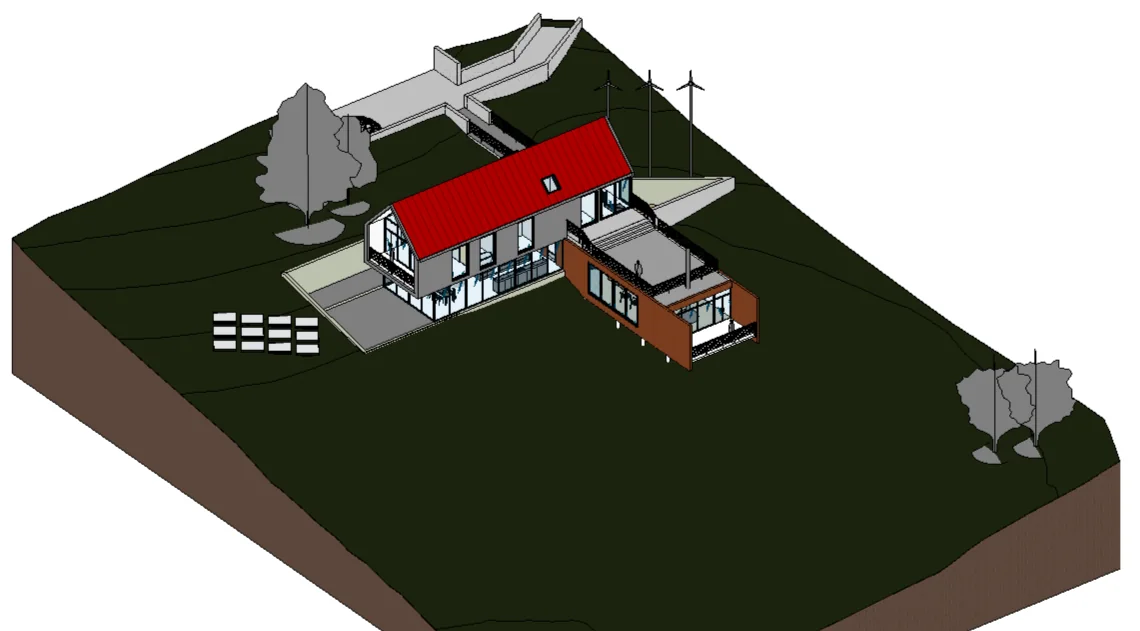
A Revit 3D view of a sample house after a comparison: the roof is coloured red for fail, the other elements keep their own colours.
Colour by verdict. View overrides only: green pass, orange warning, red fail, grey for elements the scan did not capture. One click clears them.
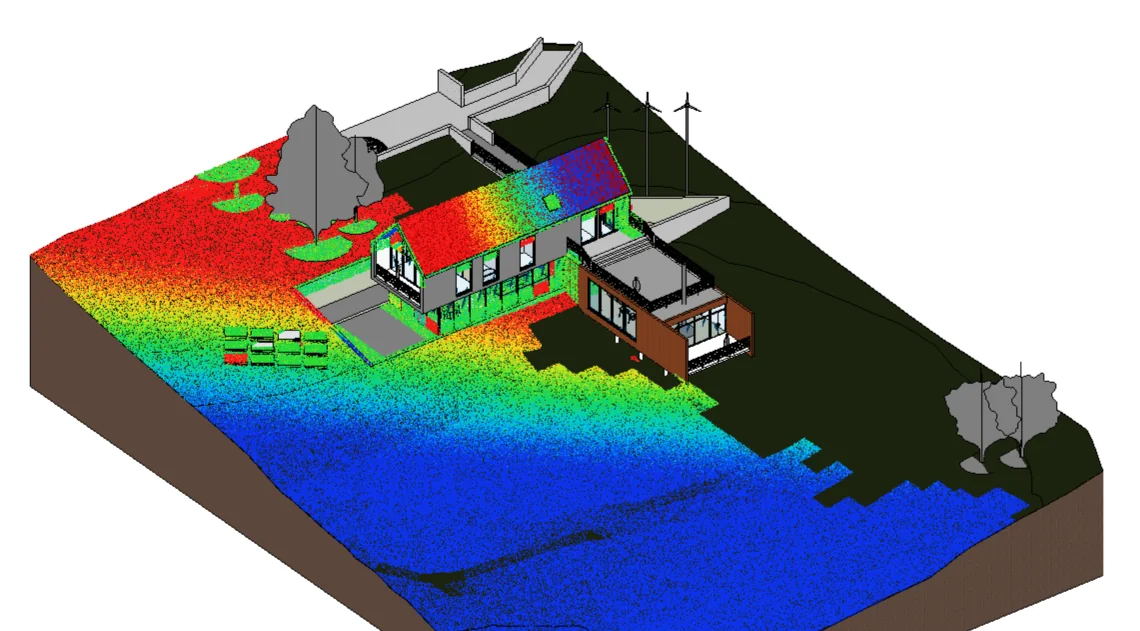
The same Revit view with the deviation heat map: the compared points are inserted as a point cloud coloured from blue through green to red across the site and the roof.
Heat map cloud (Pro). The compared points, coloured by signed deviation, inserted as a native Revit point cloud: section boxes, visibility and printing all apply.
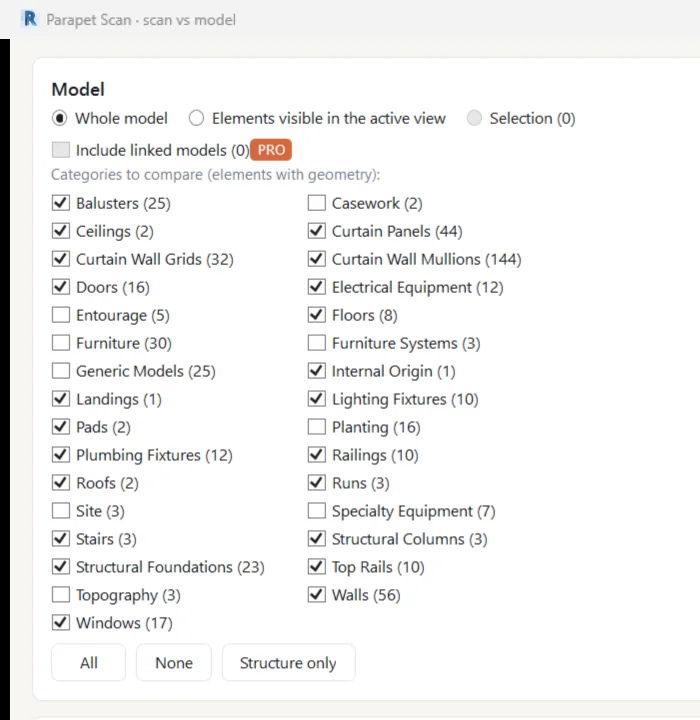
The Scan vs model dialog in Revit: scope whole model, elements visible in the active view or selection; a Pro option to include linked models; and a list of categories with element counts to compare, such as Walls 56, Floors 8, Roofs 2 and Doors 16.
Scan vs model. Whole model, active view or selection, and the categories that carry geometry.

Ribbon: Parapet > Scan

Results pane

One row per element with mean and maximum deviation and the outcome. Click to select and zoom; double-click puts a section box around the element.

Results stay with the model

Every run is stored in the document, so a colleague who opens the model sees the same verdicts.

Parameters (Pro)

Verdict, outcome, mean, signed and maximum deviation written as shared parameters: schedule, filter and tag them like any data.

Accept as-built (Pro)

Moves the selected elements to where the scan found them, in one transaction with one undo, and records the move.

Parapet Scan for RevitFreePro
Scan vs model comparison on the point clouds placed in the model
Colour the view by verdict, isolate the failures
Results pane with every element
Refine the cloud placement with a fit
Open the session in the Parapet Scan desktop app
Write results to parameters
PDF and Excel evidence report, BCF issues
Linked models, scan files outside the model
Engineering checks and tolerance profiles
Heat map cloud, verdict view, filters and schedule
Hotspots and unmodelled objects as Revit elements, issue views with snapshots
Accept as-built, change tracking between scans
Parapet Scan for Revit Pro · Pro licences open shortly - the free edition is ready now

Included in Parapet Pro and Parapet Team: one key for every Parapet app on the computer.

Download for Revit

Two downloads

Take the app if you work from scans and coordination models. Take the Revit package if the point cloud is already in your Revit model. The app package carries both.

Parapet Scan - the app

The desktop app, the command line, the Navisworks exporter and the Revit add-in with its install script. 18 MB.

1
Windows 10 / 11, 64-bit, and the .NET 10 Desktop Runtime
2
Autodesk Revit 2027 installed, to read .rcp and .rcs scans
3
Navisworks Manage or Simulate 2024-2027, to open NWC, NWD, Revit, IFC and DWG models

Parapet Scan for Revit

The add-in alone, as one folder to copy. It appears on the Parapet tab of every Revit from 2021 to 2027. 17 MB.

1
Autodesk Revit 2021-2027 (Revit LT has no add-in API and is not supported)
2
The .NET 10 Runtime for the comparison engine - a computer with Revit 2027 usually has it already
3
Internet for Pro activation and a check-in at least every 14 days; the free edition needs none

The files are not code-signed yet, so Windows SmartScreen and Revit may each ask once. Install steps · published SHA-256.

Part of the Parapet family

Scan checks what was built. The others look after the model itself. One Parapet Pro key covers them all.

Is the model itself healthy?

Parapet Desktop audits .rvt files without opening Revit: health score, parameters, purge list, standards.

Verdicts written, now what?

Parapet Hub loads the elements you select in Revit into one grid with their parameters, to edit in bulk with one undo.

Where do the point clouds live?

Parapet Audit (free) lists every external file the model carries, point clouds included, and checks that each can be found.

Questions

Do I need ReCap Pro?

No. Parapet Scan opens .rcp and .rcs scans as they are, with no export step. To read those two formats it uses the point cloud engine that Autodesk Revit 2027 installs, so Revit 2027 has to be on the same computer. Scans in PTS, XYZ or PLY need no Autodesk software.

Which models can it compare against?

glTF and OBJ models open directly. Navisworks NWC and NWD files, and Revit, IFC and DWG models, are converted through Navisworks Manage or Simulate 2024 to 2027 on the same computer; the conversion happens once per model and is cached. Parapet Scan for Revit compares against the open Revit model and needs no conversion.

Is the desktop app free?

Yes. The Parapet Scan desktop app and its command line are free, reports included, and need no registration. The licensed product is the Pro edition of Parapet Scan for Revit.

What does Parapet Scan for Revit do without Pro?

The comparison itself: it compares the point clouds placed in the model with the elements, colours the view by verdict, lists every element in a results pane and opens the session in the desktop app. Pro adds what you deliver: parameters, evidence reports, BCF issues, linked models, tolerance profiles, heat map clouds, as-built acceptance and change tracking.

When does an element fail?

You set a tolerance, a warning band and a share of points. An element fails when more than that share of its points lie beyond the warning band, and gets a warning when more than that share lie beyond the tolerance. Elements with too few points are not judged, and those that received almost none are listed as not captured.

Do my scans leave my computer?

No. Scans and models are read on your computer and the results are kept in your own user profile. Only the licence checks of Parapet Scan for Revit Pro reach parapet.app.

See also: install and licensing · Parapet for MEP and structural teams · pricing.

Scan it.
Know it.

The desktop app is free. Run it on the scan that has been waiting on the server.

Windows 10/11 · .rcp and .rcs need Revit 2027 installed · Revit add-in for 2021-2027

Parapet Scan · scan vs model, a verdict per element · free desktop appDownload