Every project has data that is easier to maintain in a spreadsheet than in the model: room programmes, door hardware, equipment lists, classification codes, cost codes. Here is how to get it into Revit - and back out - without retyping it.
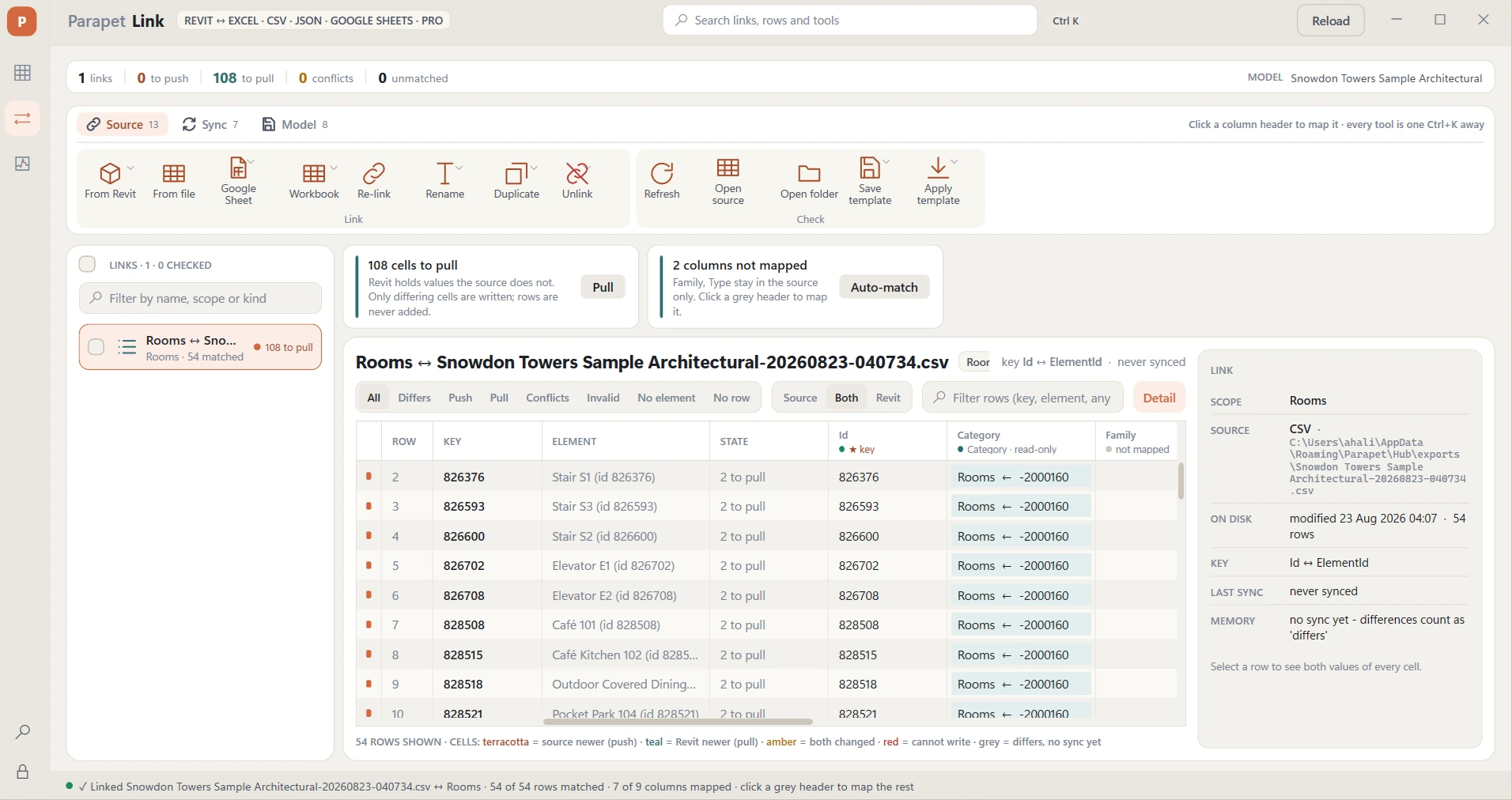
A real link, one minute old: 54 of 54 rows matched, 7 of 9 columns mapped, 108 cells to pull - and nothing written until you say so.
The three ways to get spreadsheet data into Revit
1. Schedules (built in, free, fragile)
Create a schedule with the fields you need, export it (File → Export → Reports → Schedule) to a delimited text file, edit, then… there is no built-in import. You can paste a column back into the schedule view cell by cell, which works for a dozen rows and fails for a thousand. There is no validation: a typo in a length field silently fails or, worse, writes the wrong value.
2. Dynamo or pyRevit scripts (free, do-it-yourself)
Dynamo ships with Revit and can read Excel (Data.ImportExcel) and write parameters. It is a good fit if someone in the office maintains the graph, handles units, read-only parameters, type vs instance, and missing elements - because every one of those will come up on a real project.
3. A dedicated link add-in (productised)
Tools like Parapet Link and Ideate BIMLink exist because the edge cases are the whole job. What a good link tool does:
Reads Excel (.xlsx, .xls), CSV / TSV and - in Parapet Link - JSON, XML and Google Sheets directly, so consultants can keep editing in their own tool or a shared sheet.
Lets you choose the key column that identifies the element: Element ID, Mark, Room Number, Type Name…
Maps columns to parameters, including shared and project parameters, and can create missing shared parameters.
Validates before writing: wrong data type, read-only parameter, element not found, unit mismatch - flagged per cell, with a log you keep.
Writes in one transaction so it is one Revit undo.
Exports a selection to the same formats and round-trips edits back in.
Step by step with Parapet Link
Parapet Link is one grid with two sides - Revit on one, your file on the other. You can start from either side.
Start from Revit, or from a file. In the Parapet ribbon tab click Link. From Revit writes a workbook, CSV or JSON for a category, the types of a category, your selection or a schedule (instance and type parameters) with a Parapet ID column. From file links an Excel (.xlsx, .xls), CSV / TSV, JSON or XML file or a Google Sheet someone sent you.
Read the plan, then map on the headers. Link opens the file first and proposes what it is about, the key column and the columns that match parameters by name, with the number of rows that reach an element - it will not create a link where none do. After that the rows are in the grid. Click a column header to say which parameter it writes (instance or type), which column is the key, or nothing; Auto-match does the obvious ones ("Fire Rating" → Fire Rating).
See the difference. Every cell shows both values: terracotta when the file is newer, teal when Revit is newer, amber when both changed since the last sync, red when the value cannot be written (units, read-only, a type given two values). Filter by state; colour the model the same way.
Push, pull, resolve. The counts sit under the button; one transaction, one undo. Pull writes Revit's changes into the file or sheet; Resolve picks a side for conflicts. Link remembers what both sides agreed on, so the next round knows who changed what.
The round trip: spreadsheet in, validated values into Revit, export and pull corrections back.
Retyping vs linking
Retype from the spreadsheet
One element at a time, or one schedule per category
Typos land in the model silently
No record of what changed
Do it again when the consultant sends v7
VS
Parapet Link
Key on Mark / Number / Element ID - any category, any order
Every cell validated against the parameter type and units
One transaction, one undo, a log you keep
Re-link v7 in one click - Google Sheets stays live
Typical jobs
Room programme from the client's spreadsheet → room names, numbers, departments; area check against target.
Door schedule maintained by the hardware consultant in Google Sheets → door parameters, live.
Equipment lists from MEP engineers (CSV exports) → families and spaces.
Classification (Uniclass, OmniClass, MasterFormat) and cost codes applied by type across the model.