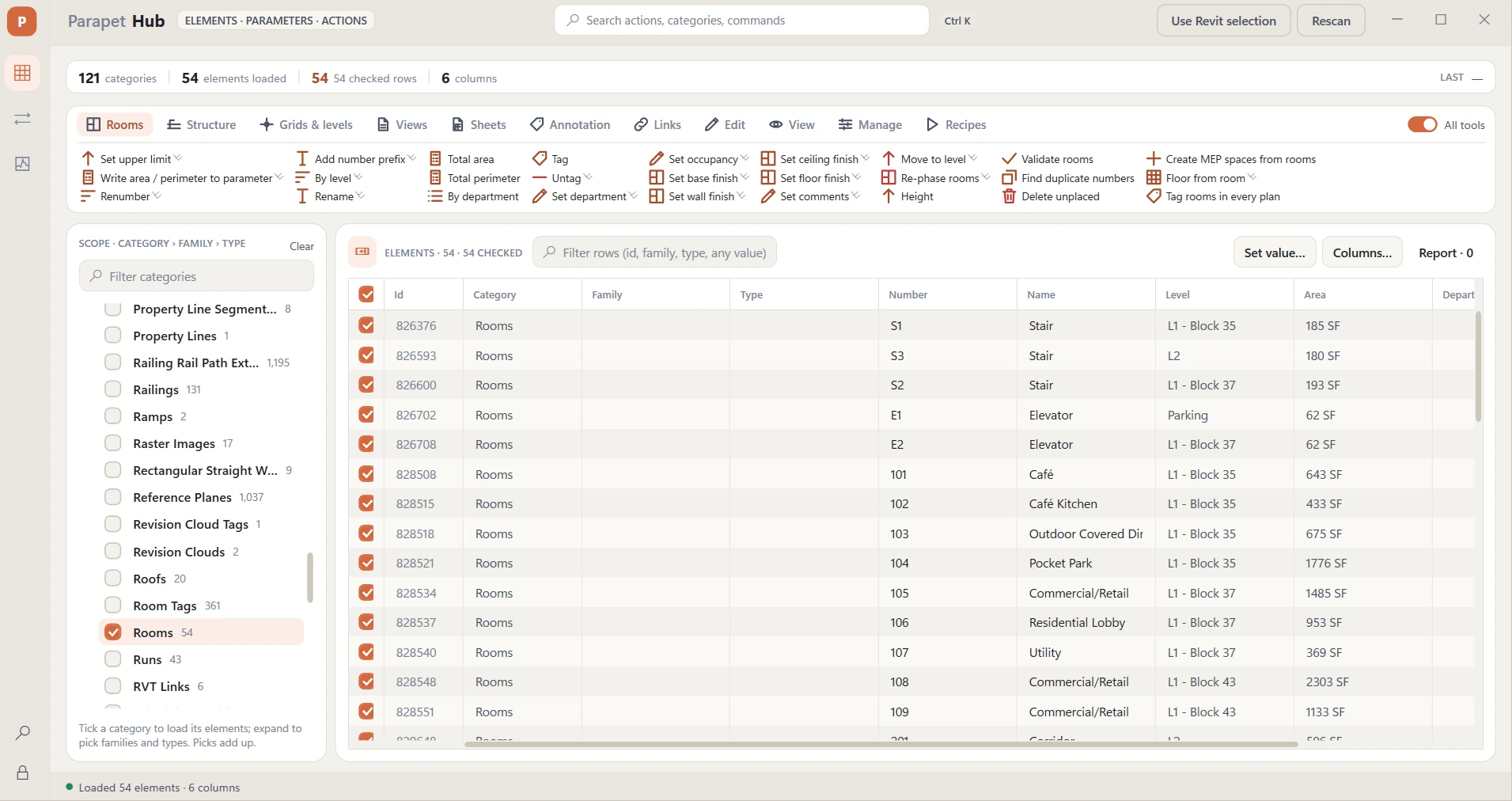
| Selection | Select in model · select same type / family · isolate / hide / unhide in view · pin / unpin · delete · check rows where… · invert · save / load selection sets · export grid to CSV · copy element ids |
| Data | Find & replace · set parameter value · fill where empty · if … then set · build value from pattern · split · copy parameter → parameter · copy from host · combine · parameter math · sequence numbers · pad numbers · clear · trim · change case · copy type ↔ instance |
| Rooms | Renumber (by position, by level, prefix) · rename · department, occupancy, finishes, comments · tag in view / in every plan · untag · total area & perimeter · area by department · area / perimeter to parameter · validate · duplicate numbers · move to level · upper limit · height from level above · delete unplaced · MEP spaces from rooms · floors from rooms · room name/number into hosted elements |
| Walls | Change type · wall function · top / base offsets · top / base constraint to level · unconnected height · location line · flip · join / unjoin · switch join order · total area & length |
| Doors & windows | Change type · renumber by room (lone opening = bare number) / by level · un-mirror · write hand or room to a parameter · sill height (set / match) · head height |
| Floors | Change type · level offset (floors, ceilings, roofs) · total area · switch join order |
| Views & sheets | Create sheets from views · create plans for levels · duplicate views / sheets · viewport type and rotation · export schedules · apply / remove template · rename · title on sheet · scale · detail level · discipline · crop region · phase & phase filter · open in Revit · renumber sheets · rename sheets · sheet fields (drawn / checked / approved / date) · change title block · revision clouds report · align viewports · delete unplaced views · delete empty sheets |
| Structure | Columns, framing, foundations: change type · base / top level and offsets · mark by nearest grids (A-3) · structural usage · z-justification · start / end offsets · structure report |
| Ceilings | Change type · ceiling type / height by room table · height into rooms · type into room Ceiling Finish · odd heights · ceilings without a room · rooms without a ceiling · fix level to match elevation · ceiling report |
| Roofs | Change type · type by slope range · base level / offset · fix base level to match elevation · overhang report & set · rafter cut / fascia depth · ridge elevation into a parameter · slope report · area & volume · unattached walls under roofs |
| Stairs, ramps & railings | Change stair / railing type · base and top level by rule · mark stairs by level · railing type by height rule · check risers, treads and width · check ramp slope and width · check railing hosts · railings per stair · multi-storey stairs · stair report |
| Curtain walls | Change panel type · change mullion type (unpin first) · panel report |
| Grids & levels | Rename grids by position (A, B … / 1, 2 …) · grid / level bubbles per end in the active view · rename levels · shift level elevations · level table |
| Areas & spaces | Renumber areas / spaces by position · spaces ← rooms name and number · totals by scheme / level |
| Annotation | Text notes: find & replace, case, type · dimensions: type, clear overrides, prefix / suffix · tags: leader on / off, orientation · revision cloud revision · line style · filled region type |
| Families | Change type by name for any family category · host report · design options report · ungroup · group report |
| Visualization | 3D view with section box · color by parameter / level / workset · override color · line weight · transparency · halftone · hide / show / isolate categories · reset overrides · crop view to targets · reset temporary hide/isolate |
| Coordination | Move to workset (pick, active view, first selected) · worksets by category · phase created / demolished · set level · check pinned · check hosts · find duplicates at the same location |
| Documentation | Tag untagged / tag all in view · align tags · add / remove revision on sheets |
| Ducts & pipes | Connect open ends · open ends report · size, and size by flow table · tray and conduit size by rule · insulation, and insulation by size table · slope check and slope by system rule · system type · rename systems by pattern · mark by system in flow order · write system info to a parameter · length per system and size · fix reference level · check fitting sizes |
| Fixtures & equipment | Mark by room in order · elevation by type table · type by room table · airflow by room rate · write panel and circuit · circuit report · face the nearest wall · check hosts, spacing, system connections and sprinkler coverage |
| Furniture & equipment | Number by room · room into a parameter · count into the rooms · type by room table · total a parameter (cost per room, level or department) · counts per type · check items outside rooms, required data, level, and items on top of each other · face the nearest wall |
| Site & mass | Number parking bay by bay · parking report with the accessible share · elevation by type table · type by a value table · mass volume and footprint · counts per type · check required data, spacing, level and overlapping footprints |
| Links | Link report · nested links · check link origins · pin / unpin · select all instances · links to worksets by rule · open Parapet Audit for the rest |
| Geometry & model | Rotate · move by offset · snap to grids · distribute evenly · elevation from level · copy to level · align elevation · flip hand / facing · mirror check · rename types / families · purge unused types · parameter values report · compare two elements · check parameter filled · model summary · select warning elements |
| Recipes | Save the last runs as a recipe · one tool per recipe (all steps, one undo, dry run first) · manage: rename, delete, export / import as JSON |