Revit exports schedules happily and imports nothing. Here is the full round trip, including the part Revit leaves out.
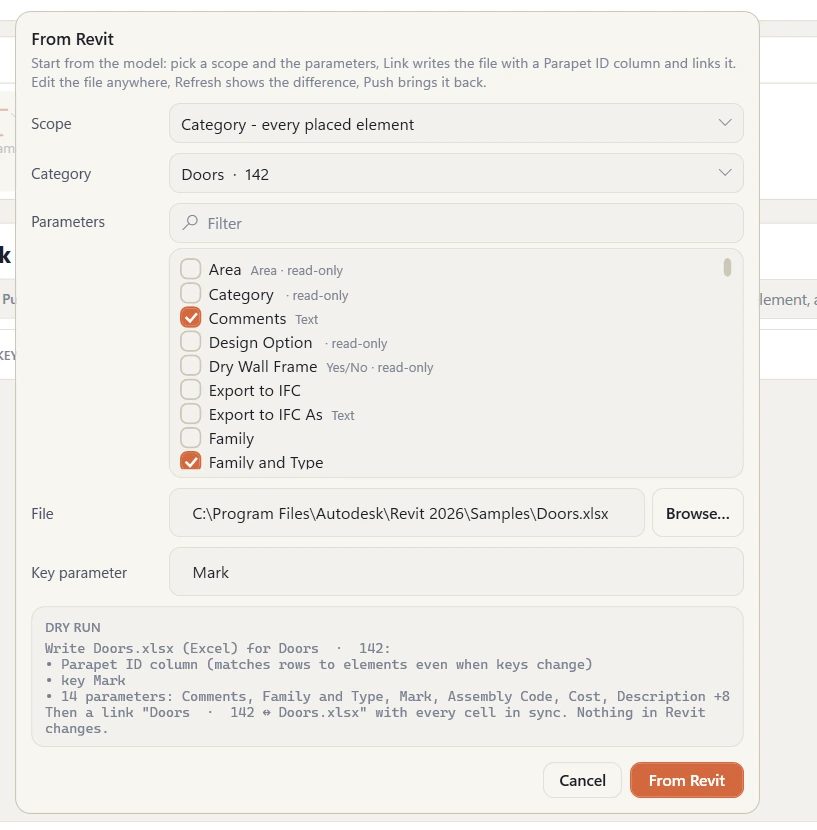
The part Revit leaves out, as one dialog: pick a scope - a schedule works too - tick the parameters, and the file comes back with every cell in sync.
Export - the built-in way
Open the schedule, File → Export → Reports → Schedule. You get a tab-delimited text file that Excel opens. Good enough for reviewing; it has no Element IDs, so there is no reliable way to match rows back to elements if Marks are duplicated or empty.
Import - the part that doesn't exist
There is no Import schedule. Options are: paste values into the schedule view cell by cell (no validation, no block paste), Dynamo (Data.ImportExcel + SetParameterByName, maintained by you), or a link add-in.
Export with Element IDs as the key, edit anywhere, import with validation.
The round trip with Parapet Link
Export. Pick the elements (or just the category the schedule covers) and the parameters you want; save as .xlsx, .csv, or write straight into a Google Sheet. The Element ID column is the key - Marks can be messy, IDs can't.
Edit. Excel formulas, lookups, a consultant's column, whatever. Share the Google Sheet and let them edit live.
Import. Re-open the file or sheet in Link; the mapping is remembered. Validation flags wrong types, units, read-only parameters and missing elements per cell.
Push. One transaction, one undo, a log you keep.
Common jobs
Door schedule reviewed by the hardware consultant → hardware sets, fire ratings, finishes written back.
Room schedule vs the brief → areas checked in Excel, departments and names corrected.
Equipment schedule → cost codes and classification (Uniclass / OmniClass) applied by type.
QA: export everything with a Comments column, review offline, push only the changed rows.
FAQ
Can I import into type parameters?
Yes. Link shows which columns map to type parameters; a type value updates every instance of that type, and validation tells you how many.
What if someone deleted the Element ID column?
Choose another key - Mark, Number, Type Name - in the mapping step. Rows that match more than one element are flagged, not written.
Try Parapet Link free for 14 days
$129/year after the trial. Excel, CSV, JSON, XML and Google Sheets; Revit 2020-2027.